How fluid CSS works
Seamlessly scale between viewport breakpoints. No more complex media queries or manually calculating responsive values!
Overview
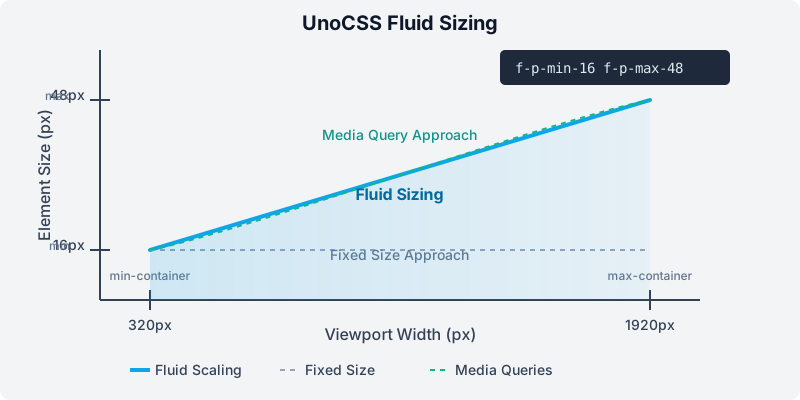
The diagram above shows how fluid sizing works:
- Define minimum and maximum sizes: Set the smallest and largest values for your CSS properties.
- Define viewport breakpoints: Set the minimum and maximum viewport widths (defaults to 320px and 1920px).
- Fluid scaling: The preset automatically calculates fluid values that smoothly transition between your min/max sizes as the viewport width changes.
How It Works
Fluid sizing uses the CSS clamp() function to create values that automatically adjust based on the viewport width:
css
/* Example of what the preset generates */
padding: clamp(
  32px,
  /* Minimum value at smallest viewport */ calc(32px + (48 - 32) * ((100vw - 320px) / (1920 - 320))),
  /* Fluid calculation */ 48px /* Maximum value at largest viewport */
);
This ensures your elements scale proportionally across all screen sizes without the need for breakpoints.
Resources
Learn more about Fluid Sizing in CSS: